Yes, you can make attachments mandatory for a service item. This can be done easily from the user interface (UI) without the need for screenshots.
Here are the steps to make attachments mandatory for a service item:
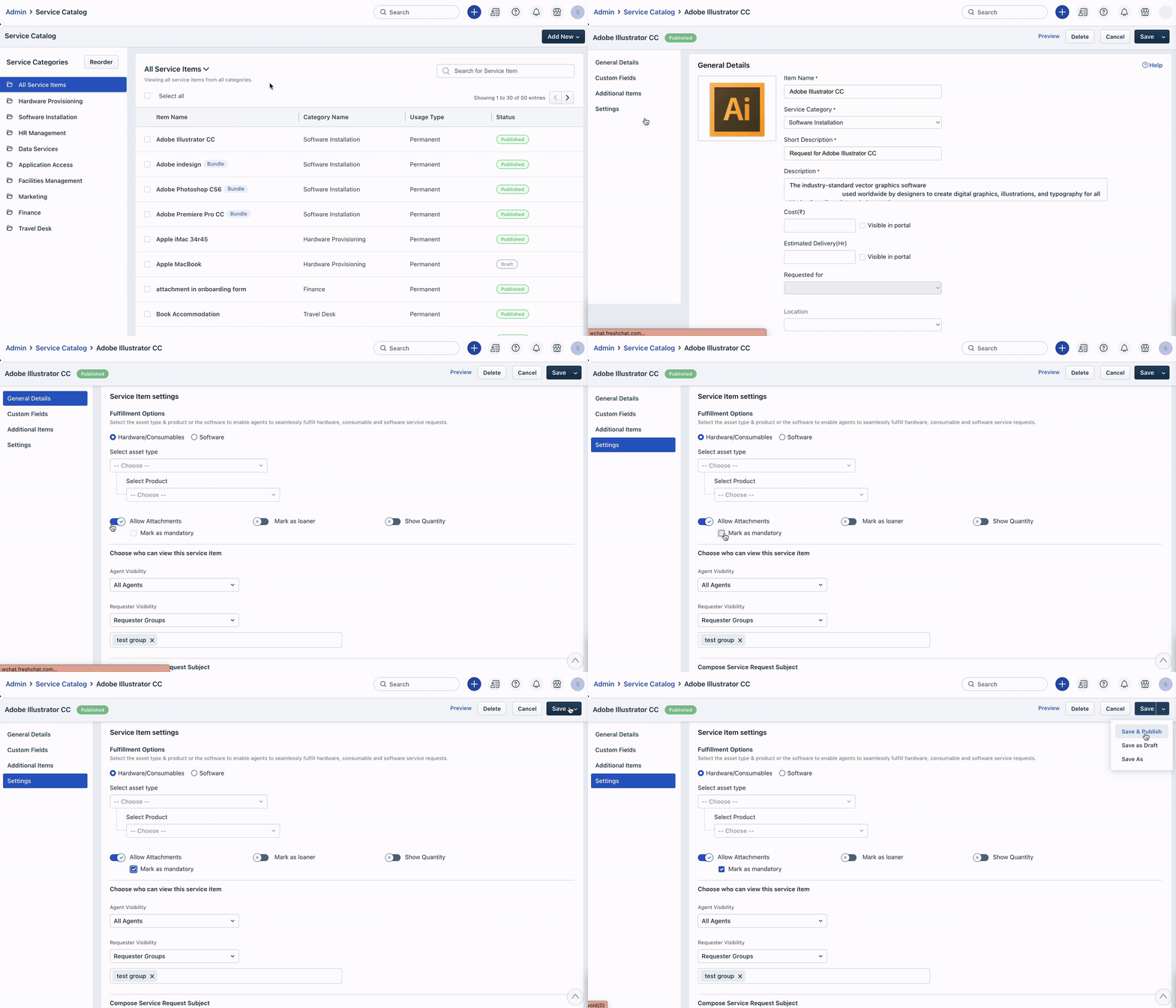
- Go to Admin > Service Management > Service request management > Service Catalog.
- Click the service item you want to make attachments mandatory for.
- Scroll down to the Service Items settings section.
- Under the Allow Attachments toggle, you will see a checkbox labeled Make as mandatory. Check this box to make attachments mandatory for this service item.
- Click Save > Save & Publish.
Once you have made attachments mandatory for a service item, your customers will not be able to submit a request without attaching the required files. This will help you gather all the necessary information and documents from your customers, making it easier for you to provide them with the best possible service.
Was this article helpful?
That’s Great!
Thank you for your feedback
Sorry! We couldn't be helpful
Thank you for your feedback
Feedback sent
We appreciate your effort and will try to fix the article