Localising service desk operations is essential when your workforce is globally spread out. With Servicebot now available in many languages*, enable your agents to work on-the-go using the Servicebot in the language of their choice.
*Note: This is currently available for all languages supported by Freshservice. Check out all languages supported here.
How do I update the language?
1. Go to Slack > Servicebot > Home. Click Update Language.
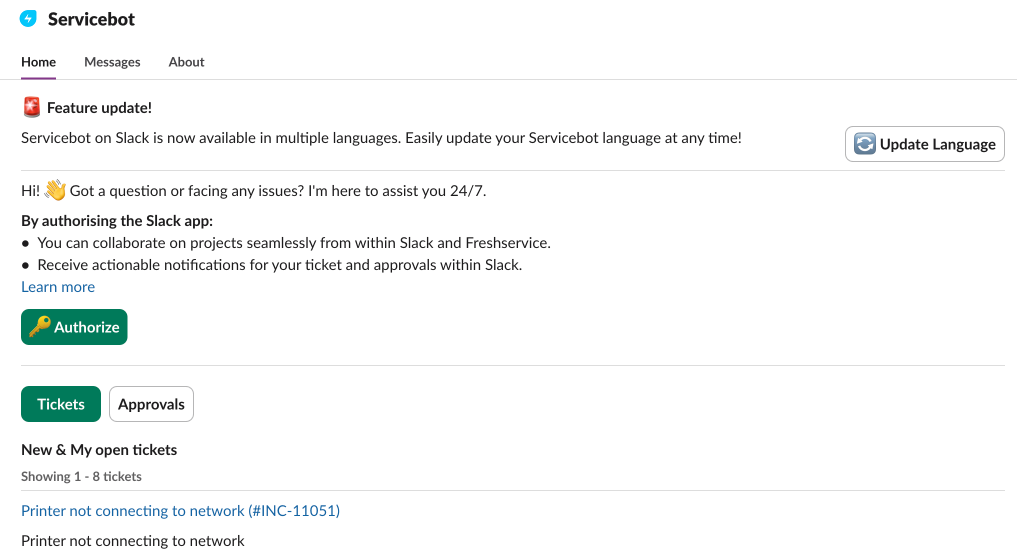
2. On your Freshservice profile page that opens in a new tab, click Edit Profile.
3. Update your service desk language from the Language dropdown under the Other Information section.
4. Click Save.
This will translate all buttons, labels, and ticket actions on the Servicebot (Freddy AI Agent).

Note: Servicebot’s language configuration is in-sync with your Freshservice account’s language preferences. This does not update the Slack language preferences.
Freddy AI Agent is also multi-lingual and ensures that responses are delivered in the language of the end user.
Was this article helpful?
That’s Great!
Thank you for your feedback
Sorry! We couldn't be helpful
Thank you for your feedback
Feedback sent
We appreciate your effort and will try to fix the article